Nibi: Agent Watch
A small friend on your desktop that watches your AI agents.
Nibi shows what Claude Code, Codex, Antigravity, VS Code and ChatGPT are doing, right now, in one soft blob. When an agent needs you, Nibi rings the bell. Everything stays on your PC.
PRESS START


Tutorial · How it works
Three steps, then Nibi does the watching
Install it
Run the per-user installer. No admin prompt, no account. Nibi lives in
%LOCALAPPDATA%\Nibi.Connect your agents
In Settings → Agents, click Install hooks for Claude Code, Codex, Antigravity or Copilot. Each settings file is backed up first. Then switch on the services you use.
Nibi watches
It stands on the title bar of the window you are using, hatches a sprite for every live session, and rings the bell when one needs you.
World 1 · What Nibi watches
Player select: every agent, every build, one glance
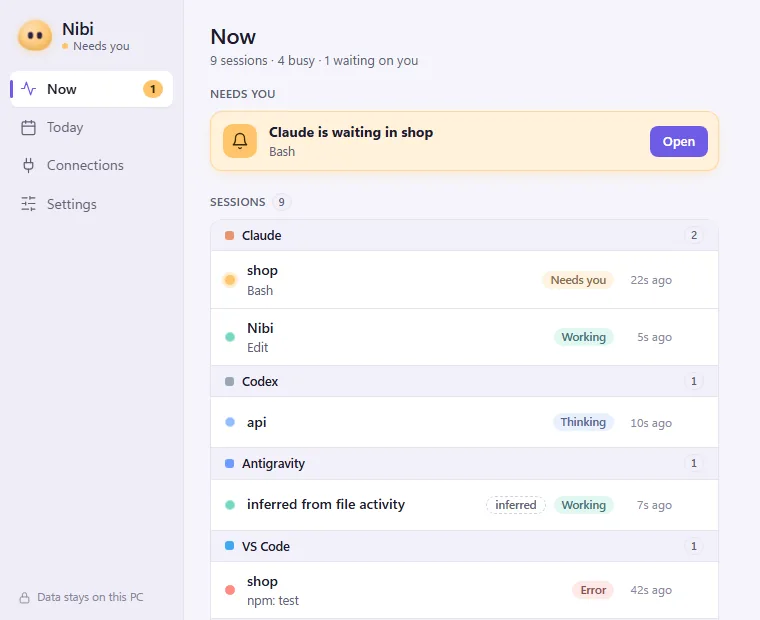
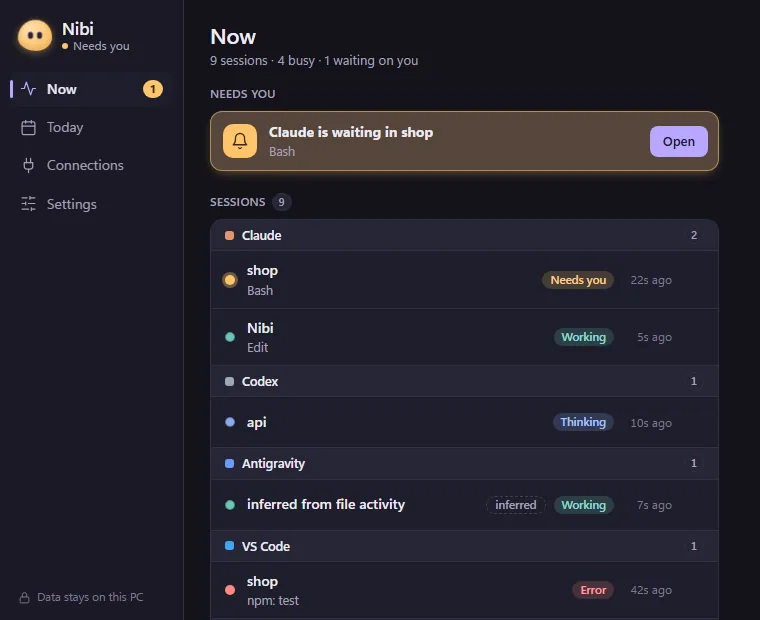
Each running session hatches a small sprite that floats around Nibi: the Flock. Three sprites means three agents at work. A sprite with a ring of amber is waiting for you.
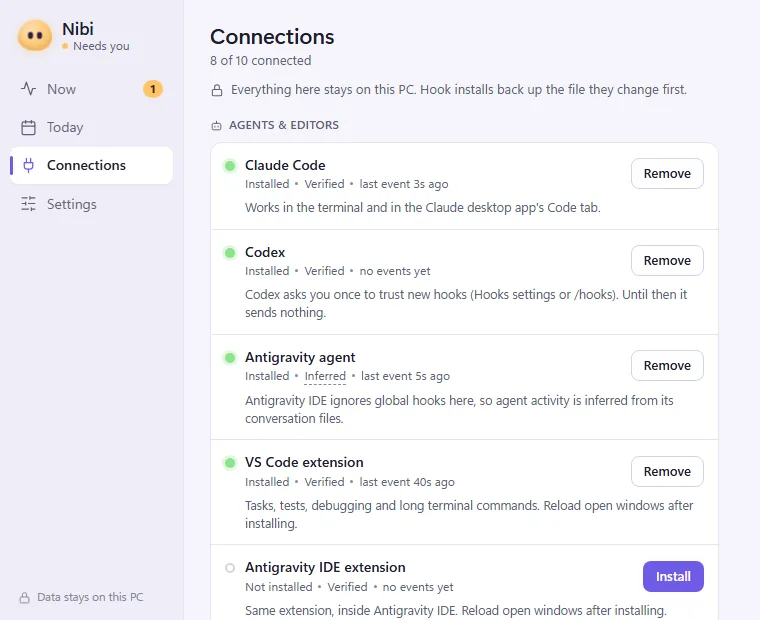
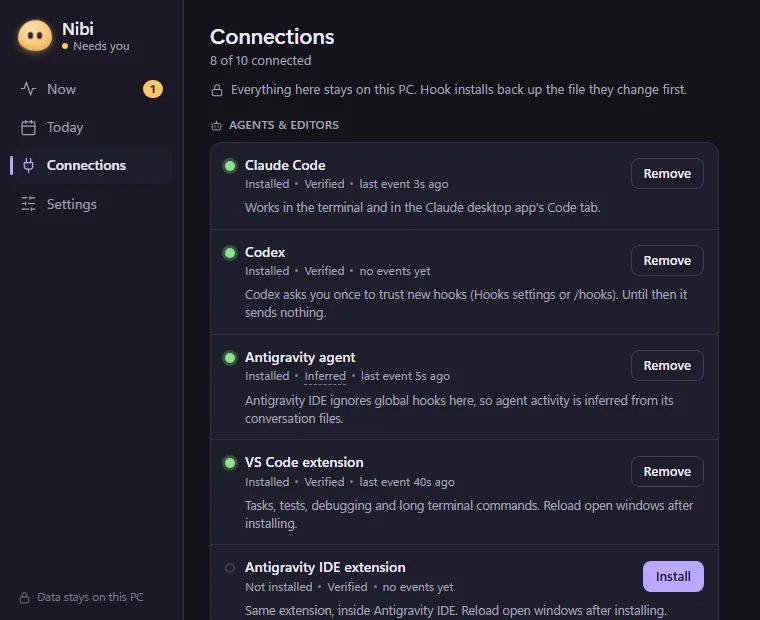
Agents and editors
Claude Code
CLI and the desktop Code tab, through its official hooks. Thinking, working, needs you, done, error.
VERIFIEDCodex
CLI and app hooks, including permission requests.
VERIFIEDAntigravity
Working and quiet, inferred from its conversation files.
??? INFERREDVS Code
Copilot agent hooks plus a small extension for tasks, tests and debug runs.
VERIFIEDChatGPT
In use and reply ready, from its window and notifications.
??? INFERRED
Bonus stages: services
GitHub CI
Workflow runs passing or failing, and reviews waiting on you.
Vercel
Deploys building, ready or failed. Your token lives in Windows Credential Manager.
DevPulse
Your sites up or down. Only critical incidents turn Nibi red.
Calendar
A heads-up before your next meeting, from an iCal link.
Music
What is playing, so Nibi can sway along.
A solid sprite means a verified event from a hook. A dashed one means Nibi is inferring. Silence never means done: a session that goes quiet becomes “unknown”, not “finished”.
World 2 · Meet the moods
Status effects: one look tells you how things are going
The most urgent session sets Nibi's mood. Hover or tap a card to wake it up.
Power-ups: Nibi also puts on headphones when music is playing, and a little hat before your next meeting.
World 3 · The Approval Bell
Quest: never leave an agent waiting
Agents stop and wait for permission all the time, often in a window you are not looking at. Nibi notices within a second.
- It hears the request. A permission prompt from Claude, Codex or Copilot turns Nibi amber.
- It walks over and taps. Nibi hops to the edge of that terminal or editor and knocks on it.
- One click takes you there. Click Nibi and the exact window comes to the front. You answer in the agent, as usual.
Nibi never answers an agent's permission prompt for you. That decision is always yours.
> All quiet. Press A to make an agent ask.
APPROVALS CAUGHT: 0
World 4 · Rules and approvals
Game rules: small helpful rules, you stay in charge
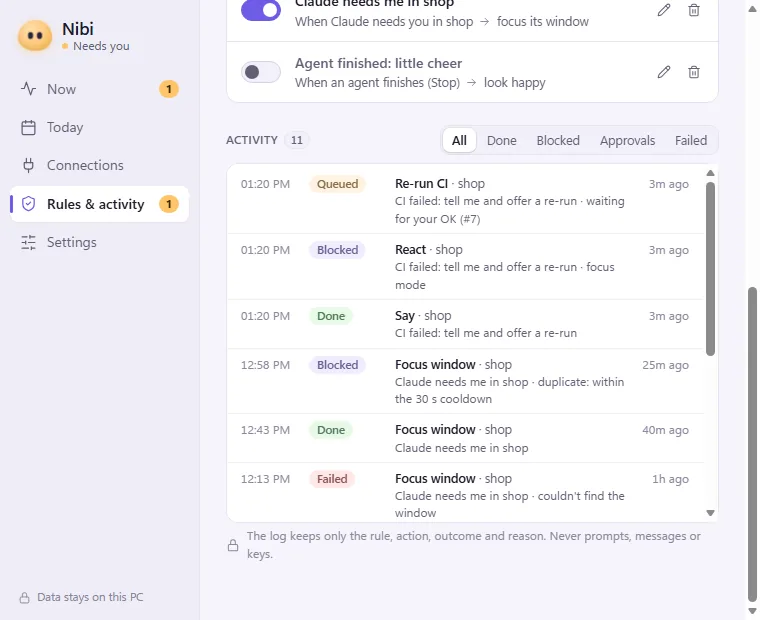
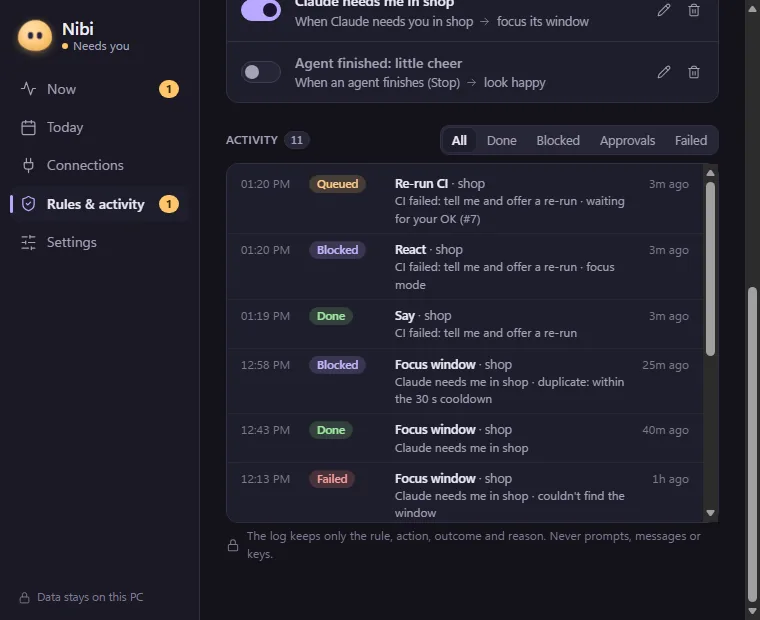
Rules are simple “when this happens, do that” cards, stored as data, never as code. What a rule may do is fixed by Nibi, not by the rule.
Safe actions
Say something, react, focus an agent's window, open a link from a trusted service. Once you switch the rule on, it just happens.
Anything else
Re-running a failed CI job and anything that changes the outside world waits for your Yes, every time. No answer in 15 minutes means no.
Off limits
Shell commands, deleting files, reading passwords, or anything built from the text of an event. Nibi cannot do these at all.
Everything is audited
- Every action Nibi tries is written to an append-only log: done, blocked, queued, approved, denied or failed, and why.
- The same event twice never runs an action twice.
- One Pause switch, in the tray and on right-click, stops every action.
- Focus mode keeps Nibi quiet except for approvals and errors.
World 5 · A day in Nibi's life
Level select: from the first prompt to lights out
An example day. Pick a moment, or let the day play.
08:55
Coffee time. Nothing is running yet, so Nibi just breathes.
World 6 · Your day
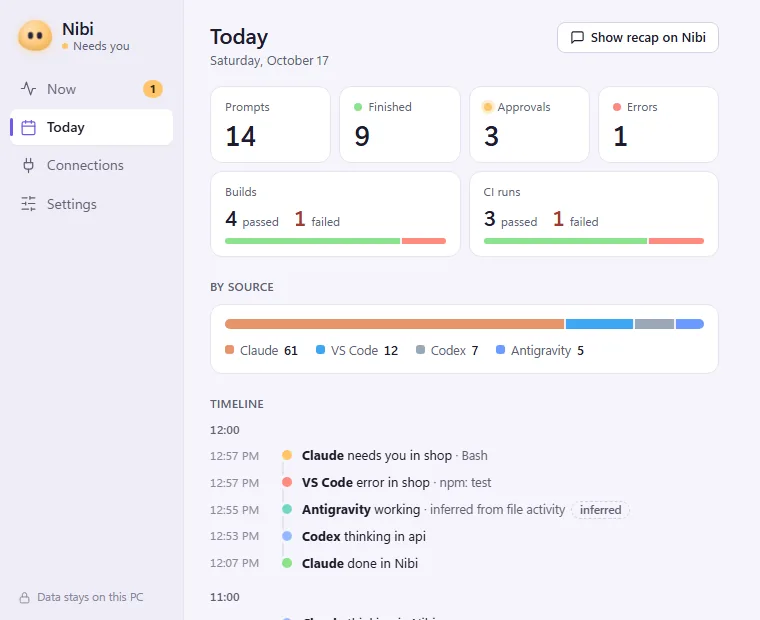
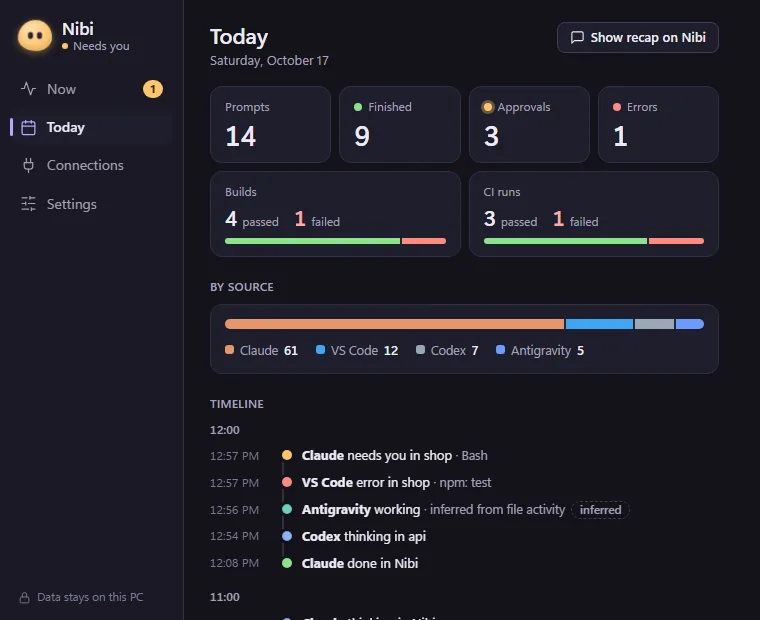
Scoreboard: a recap at the end of the day
How many prompts you ran, what finished, how often an agent waited for you, which builds and CI runs passed. Ask Nibi for the recap and it says it in a bubble.
Talk level is yours: Quiet (only approvals, failures and the recap), or Playful.
World 7 · Privacy
Save file: everything stays on your PC
Nibi has no servers, no accounts and no telemetry. It listens only on your own computer (127.0.0.1), behind a random token. Once a day it asks GitHub whether a newer version exists (you can switch that off in Settings); nothing about you is sent.
Never stored
- Your prompts or the agent's replies
- Tool inputs: commands, file contents, code, diffs
- Window titles
- Secrets. A token you add (for example Vercel) is kept in Windows Credential Manager, never in a file.
What is stored, and for how long
- Event historyWhich tool, project folder name, state, tool name and time. Kept 14 days (you can change it), then deleted.
- Audit logRule, action, outcome and reason. Kept 90 days.
- Debug logThe same minimal events, capped at about 5 MB.
- Settings and rulesUntil you change or remove them.
All of it lives in %APPDATA%\Nibi. Delete the folder and it is gone.
This website has no analytics, no cookies and no third-party scripts. The full privacy page covers what optional features send and how to delete your data.
World 8 · For your agents
Cheat code: let Claude ask Nibi how things are going
Nibi includes a read-only MCP server. Agents can ask who is waiting for you, how today went, and which approvals are pending. They cannot change anything, and they can never answer an approval.
claude mcp add nibi -- "%LOCALAPPDATA%\Nibi\bin\nibi-hook.exe" mcpFor Codex, add the same command to config.toml under [mcp_servers.nibi]. Tools: list_sessions, get_day_summary, get_pending_approvals.
Want agents to make Nibi speak? Switch on Let agents make Nibi speak and react in Settings → MCP. It is off by default, allows at most one line every 10 seconds (up to 120 characters), and each one is logged without the words.
World 10 · Install and uninstall
Easy to add, clean to remove
Nibi installs like any small Windows app and leaves nothing behind when you remove it.
Installing
- Installs for you only, in
%LOCALAPPDATA%\Nibi. No admin prompt. - Does not start with Windows unless you switch that on.
- Agent hooks are only added when you click Install hooks. Each settings file is backed up first, and other tools' hooks are left alone.
This build is not code-signed yet. Windows SmartScreen may say it protected your PC. Choose More info, then Run anyway.
Uninstalling
- Remove Nibi from Settings → Apps, like any other app.
- The uninstaller removes every agent hook Nibi added (Claude Code, Codex, Antigravity, Copilot) before it deletes any files.
- Your history is kept unless you tick Delete the application data, so a reinstall picks up where you left off.
System requirements
- Windows 11 or 10, 64-bit (x64).
- Microsoft Edge WebView2 for the panel. It comes with Windows 11 and most up-to-date Windows 10 PCs.
- Your agents, any of: Claude Code, Codex, Antigravity, VS Code with Copilot, ChatGPT.
- Optional: the GitHub CLI (
gh) for CI and reviews, a Vercel token, a DevPulse site, an iCal link.
Hints · Questions
Things people ask
Is it free?
Yes. You can download it and use it on your own computers for personal or work use, free of charge. It is not open source; see the licence.
Does Nibi send my data anywhere?
No. Nibi has no servers, no accounts and no telemetry, and it never stores your prompts, the agents' replies or tool inputs. The only network calls are the services you switch on talking to their own servers (GitHub through gh, Vercel, your DevPulse, your calendar feed), AI talk if you turn it on, and a daily check of GitHub for a newer version, which you can turn off. The privacy page has the details.
Why does Windows warn me when I run the installer?
This build is not code-signed yet, so SmartScreen does not know it. Choose More info, then Run anyway. Updates are still safe: each one is signed with Nibi's own key and checked before it is installed.
Which agents work with it?
Claude Code and Codex through their hooks, VS Code with Copilot agent hooks and a small extension, and Antigravity and ChatGPT, which Nibi infers and draws dashed. It also follows GitHub CI and reviews, Vercel, DevPulse, your calendar and music.
Will it slow my PC down?
Measured on the developer's PC: asleep with the panel closed, Nibi uses about 1% of one CPU core; busy and animating at 60 frames a second, about 3 to 5%. The panel only exists while it is open.
Can Nibi talk with AI, using my own key or a local model?
Yes, if you want it to. AI talk is optional and off by default. Switch it on in Settings and pick a provider with your own API key, or a local model on your PC. Your key is kept in Windows Credential Manager, never in a file. Nibi sends only short event summaries to the provider you picked, never your prompts, code or the agents' replies.
How do I uninstall it?
Settings → Apps → Nibi → Uninstall, or irm https://niranjand.in/nibi/uninstall.ps1 | iex, or scoop uninstall nibi if you used Scoop. The uninstaller removes every agent hook Nibi added before it deletes any files. Your history is kept unless you tick Delete the application data (or delete %APPDATA%\Nibi).
How do I report a bug?
Use Send report in Nibi: it opens a GitHub issue in your browser with the details filled in, and nothing is posted until you have read it and pressed Submit. You can also open an issue yourself at github.com/Niranjan266/nibi-releases.
Does it need admin rights?
No. It installs for you only, in %LOCALAPPDATA%\Nibi, without an admin prompt. The one-command install and Scoop do the same.
How does it update?
Once a day Nibi asks GitHub whether a newer version exists. It installs one only when you press Install, and every update is signature-checked. You can switch the check off in Settings.
Insert coin: get Nibi 1.5.0
Windows 11 and 10, 64-bit. Per-user installer. The button downloads Nibi-setup.exe, the latest version, straight away.
Install with one command
In PowerShell (no admin). It downloads the latest installer from GitHub and installs Nibi for you only:
irm https://niranjand.in/nibi/install.ps1 | iexOr with Scoop:
scoop bucket add nibi https://github.com/Niranjan266/nibi-releases
scoop install nibiRead the script first if you like: install.ps1. To remove Nibi the same way: irm https://niranjand.in/nibi/uninstall.ps1 | iex
Patch notes · Changelog
1.5.0
Nibi comes to life.
- Give life to Nibi. Optional: let Nibi talk in its own words with your own OpenAI, Claude or Gemini key, a local model, or the Claude Code or Codex app you already use.
- Life with you. Good morning cards, mood memory, break reminders, celebrations, feeding, seasonal outfits and stickers.
- Sleeps less. Nibi stays awake while you work, wakes when you touch it, and you choose when it naps.
- Welcome tour, crash log, reduced motion and better keyboard and screen reader support.
- One-command install. PowerShell or Scoop.
1.4.0
Everyday comforts, and a livelier Nibi.
- Everyday. Nibi's window reopens where you left it. Click a bubble on Nibi to jump to the right page. Left-click the tray for a quick popover.
- More control. Undo a disconnect, test each connection, export your day, keep 90 days of history, optional sounds.
- Any screen. Drag Nibi to another monitor and it stays there.
- Livelier. A crouch before every hop, a wobbly antenna, leaning, drowsy eyelids, eyelid blinks, a sharper Pixel look and a new Spin antic.
- Fixes. Twelve fixes, including lower idle CPU and clicks that no longer slip through a sleeping Nibi.
1.3.0
Nibi learns to play.
- Play. When nothing needs you, Nibi stretches, yawns, chases butterflies, waves at your cursor and talks in its sleep. Choose how playful in Settings.
- Pastel Arcade. A second style for Nibi and its window.
- Fix. Nibi no longer vanishes with off-screen windows.
1.2.0
A new face, and everyday comforts.
- New logo. Nibi as a die-cut sticker, on the taskbar, the tray and the installer.
- Snooze. Not now? Put an approval off for 15 minutes or an hour, and it comes back.
- Mute a project. For an hour, until tomorrow or until you unmute it. Its automations pause and Nibi stays quiet about it.
- Your theme. Light, Dark or Match Windows.
1.1.0
A friendlier Nibi window.
- Nibi's desk. Home opens with Nibi's face and one sentence about what needs you. Waiting things are sticky notes with big buttons; sessions are index cards with a stamp.
- Setup checklist. Connect an AI helper, see a live session, pick how chatty Nibi is, try an automation, start with Windows.
- Plain names. Home, Today, Apps, Automations and Settings, with keyboard shortcuts, toasts and Undo.
- Automations from scratch. Write your own, with a sentence preview.
- Right-click Nibi. Its own menu: Open Nibi, Today's recap, Focus mode, Pause actions, Pixel look, Hide and Quit.
1.0.0
The first public release.
- Nibi and the Flock. A soft, physics-driven creature that stands on your window's title bar, with a sprite for every live agent session.
- Agents. Claude Code, Codex, Antigravity, VS Code and Copilot, and ChatGPT, with verified and inferred states shown honestly.
- Approval Bell. Nibi walks to the waiting agent's window and taps it. Click to bring it to the front.
- Services. GitHub CI and reviews, Vercel deploys, DevPulse, calendar and music.
- Rules and approvals. Safe actions run on their own, everything else asks you, and every attempt is audited. Pause and focus mode.
- Panel. Now, Today, Connections, Rules and activity, and Settings, in light and dark.
- MCP server. Read-only tools so agents can ask Nibi about sessions, the day and pending approvals.
- Updates. Nibi checks GitHub for a new version once a day and installs one only when you press Install; every update is signature-checked.
- Installer. Per-user, no admin, and an uninstall that removes every hook.